Brawl Online Progress Report #1: Celebrating 150,000+ Matches of Project+!
Welcome to the very first progress report / dev blog for Brawl Online!
Since launching in mid-October the response from the community has been amazing: thousands of active players have already played well over 150,000 matches of Project+! Seeing matchmaking active 24/7, people able to play ranked sets even across the Atlantic Ocean, and so many people coming back day after day has been so motivating!
The past three weeks have been a massive re-architecting across all of Brawl Online -- from the desktop launcher and matchmaking servers to our in-game menus and rollback engines themselves.
Since the launch we have shipped over 100 updates shaped by those 150,000+ matches and direct feedback from our players. Here is a look at the major breakthroughs that have landed over the past three weeks.
New Ways to Play Project+ Together
2v2 Matchmaking & The Live "Pair Waiting Room"
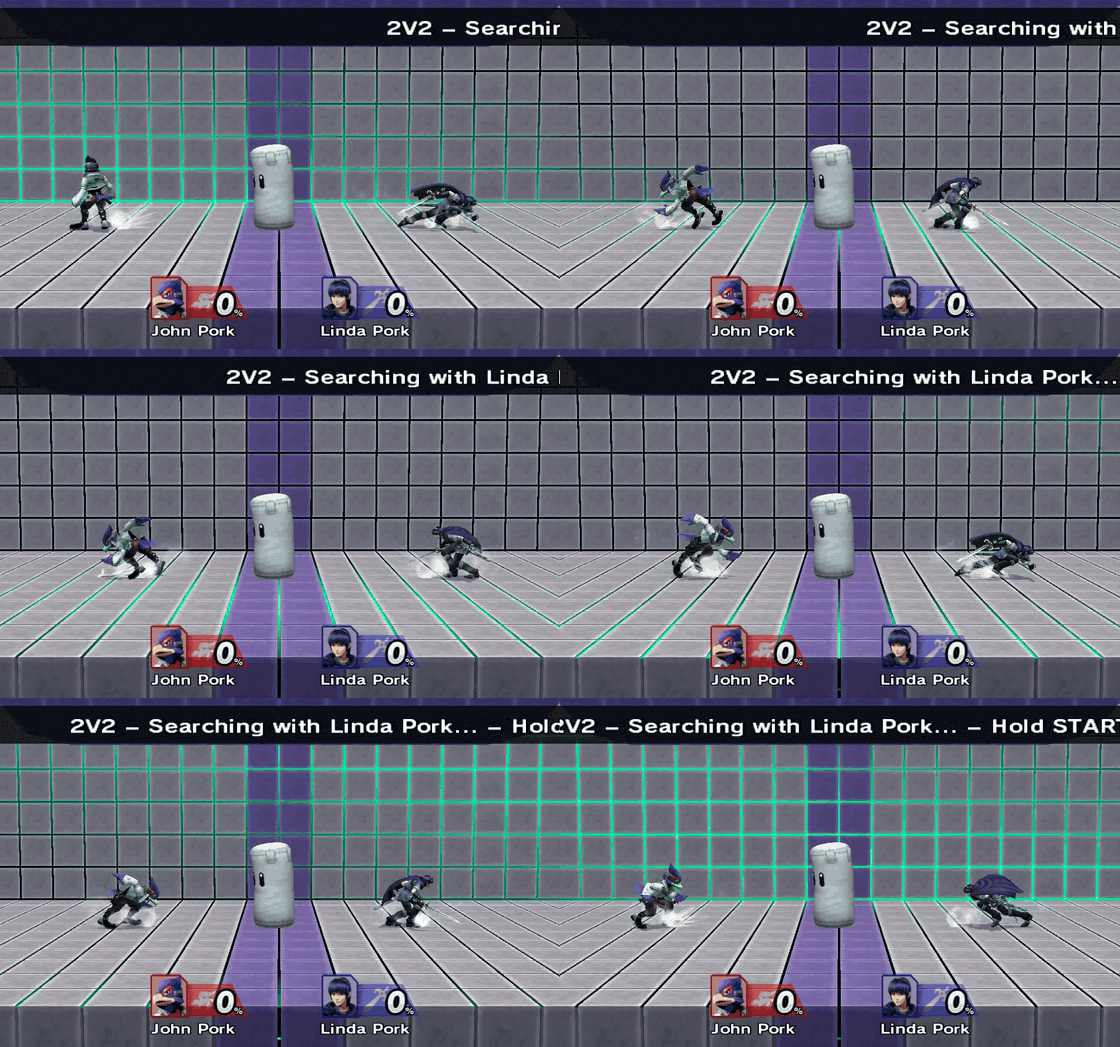
Doubles is cleaner than ever with the new Doubles matchmaking queue:
- Queue Solo or With a Partner: Jump in by yourself or team up with a friend.
- Live Doubles Waiting Room: Instead of sitting in separate rooms while waiting for opponents, queuing with a partner drops the two of you straight into a 2-player online Waiting Room. This lets you warm up and spar together until a match is found.
Special Versus & Online All-Star Mode
Project+'s full suite of Special Versus modes are now playable with custom rulesets, enabling All-Star Mode, Stamina Mode, Turbo Mode, and more.
Bringing All-Star Mode online required solving a unique technical puzzle: unlike normal matches where the loading all happens before the match starts, All-Star unloads your defeated character and loads your next character in the middle of the match. We expanded our rollback snapshot architecture so even if a rollback rewinds across the exact moment a stock is lost, the engine cleanly restores the previous fighter without desyncing or lagging.
Highlights & Post-Game Stats
Capturing your best moments no longer requires having your screen recorder running at all times. We built a complete highlight detection, clipping, and video rendering studio directly into Brawl Online:
- Automatic Combo & Highlight Finder: The launcher automatically scans your replays to find high-damage conversions and KOs and organizes them under Replays > Highlights.
- Instant Clip Hotkey: Press
L+R+Zduring a match to bookmark the previous 20 seconds. - Seek Bar Highlight Stars & Draggable Clip Handles: While watching any replay, every highlight shows up on the collapsible seek bar. Clicking Clip pauses playback and drops two draggable blue handles onto the timeline so you can trim and save custom segments from any replay or live match.
- Highlight Video & Combo Movie Rendering: Select any highlights (or click the clapperboard icon on a replay row to render a full match) and export 60 fps videos, with or without music, either as individual files or stitched into a combo movie.
- Post-Game Replay Stats: If you've played Slippi, you're familiar with this one! Every replay page now includes a Stats tab alongside Highlights breaking down advanced statistics from the match.
Player Profiles, Dynamic Theming & Setup
- Customizable Player Profiles & Hover Cards: Click your account in the header to open your profile, shareable on the web at brawlonline.net/profile/<code> with rich Discord link previews. Customize your Main(s), Country Flag, Social Media (Discord, Twitter/X, Twitch, YouTube, TikTok, Instagram), and view your Ranked win/loss record.
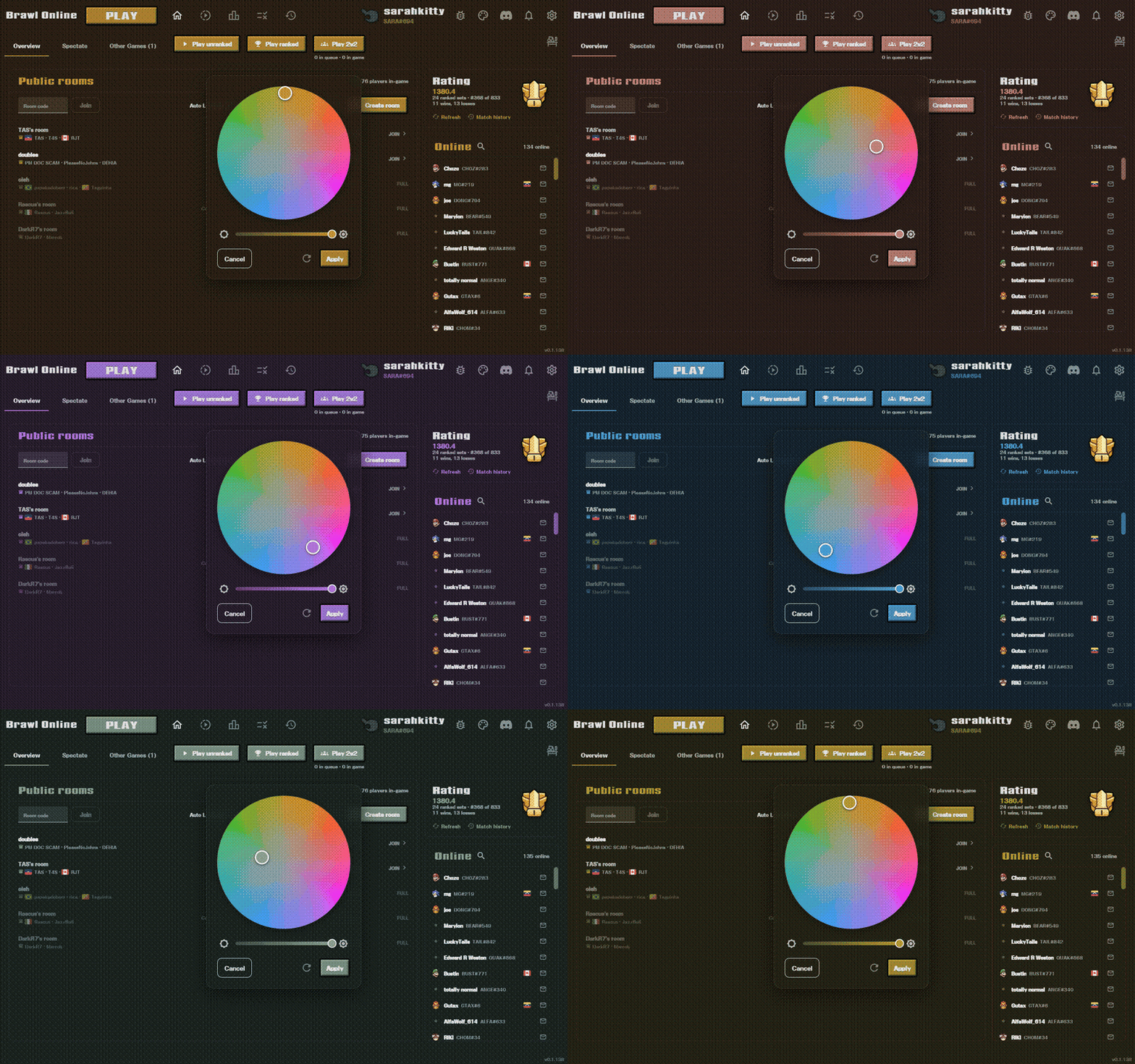
- Theme Color Wheel: Click the palette icon in the launcher header to open a circular color wheel. Dragging the wheel recolors the entire launcher.
- Any Disk Format: The launcher now verifies the game partition's actual data directly, accepting
.rvz,.wbfs,.wia,.gcz, and.cisofiles out of the box. - One-Click Training Pack: Launch the amazing and beautiful WispSSBM's Project Punch Training Pack with one click, bypassing the tedious setup process!
Optimizing Latency & Connectivity
Making online play feel like offline even on weaker hardware comes down to optimizing performance and scheduling while having resilient peer-to-peer networking.
A Full Frame (16.7 ms) Less Input Lag
Previously, because of the order in which the game and emulator polled controllers and slept between frames, a button press sat waiting for a full frame before the online session picked it up (making 2 frames of delay feel like 3). Over the past three weeks, we totally re-engineered controller I/O and frame boundaries, shaving a full 16.7 ms frame of input lag everywhere.
Online Wii Remotes & Early Bluetooth Interception: Alongside adding full online support for Wii Remotes, Nunchuks, and Classic Controllers, we hooked the guest pad thread so Bluetooth controller passes are handed to the rollback engine and transmitted the microsecond they finish, cutting local read-to-use latency in half (from ~32 ms down to ~15.5 ms at delay 1).
Optimized Input Timing in "Other Games": By optimizing the scheduling for the whole-machine rollback, inputs are sampled fresh at the start of every frame -- cutting input lag by another full frame across games like Melee, Mario Kart: Double Dash!!, Super Mario Sunshine, and Mario Kart Wii.
Better Frame Pacing
We've made enormous amounts of micro-optimizations here.
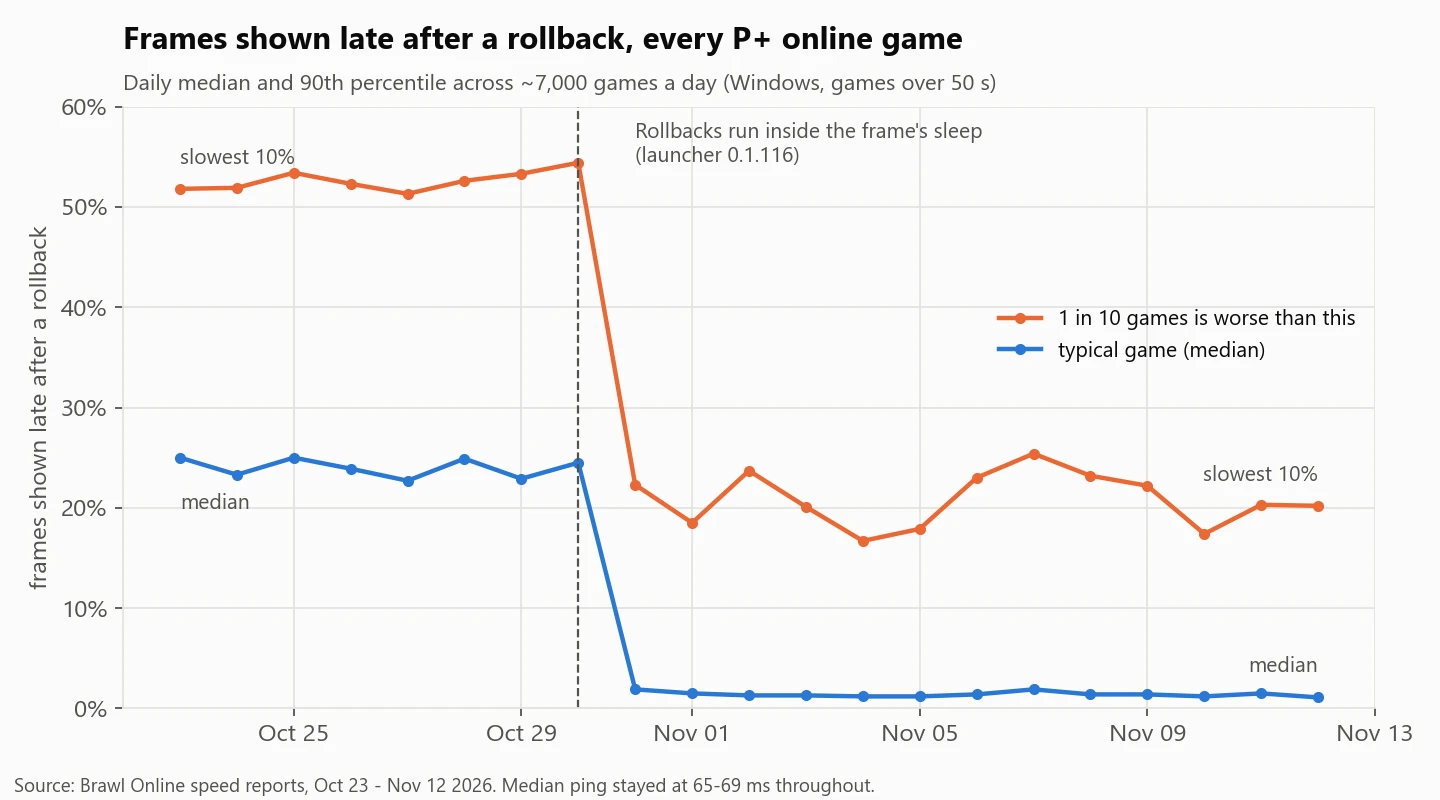
On a modern PC simulating a frame takes about 2–4 ms, leaving ~12 ms of sleep before the next frame is due. Previously, if your opponents inputs arrived during that sleep and triggered a rollback, the emulator finished sleeping first and only then performed the rollback often causing the frame to stutter and delay.
Now the frame scheduler monitors incoming network packets while sleeping, waking up early to avoid wasting time snoozing. In cross-country tests, frames presented late after a rollback dropped nearly 95% with this change alone!
Defeating Nasty Networks
One of the hardest problems to solve when running a platform like this is figuring out how to connect players across the many network types they might be trying to play on.
- Dual-Stack IPv6 Alongside IPv4: Nearly 47% of Brawl Online players support IPv6. Every peer-to-peer connection now dials IPv4 and IPv6 in parallel, preferring IPv4 whenever it connects while seamlessly bypassing strict CGNATs over IPv6 when IPv4 hole-punching is blocked.
- Breaking Through Strict IPv4 Routers: We added automatic NAT-PMP port mapping when UPnP is blocked, low-port hole punching (
1024–1031) for cellular, and better handling when an aggressive ISP swaps a player's public IP address. - Faster Freeze Recovery & Matchmaking Protections: By optimizing the network stack, we're now able to recover from Wi-Fi hiccups 5x faster!
Faster and More Reliable Rollbacks
When a rollback occurs, the emulator has to restore a snapshot of console memory and fast-forward several frames of gameplay in just a few milliseconds and both computers must stay completely in sync.
Faster Rollback Savestates & Potato Mode
We completely overhauled how memory snapshots, graphics passes, and JIT code are handled during rollbacks:
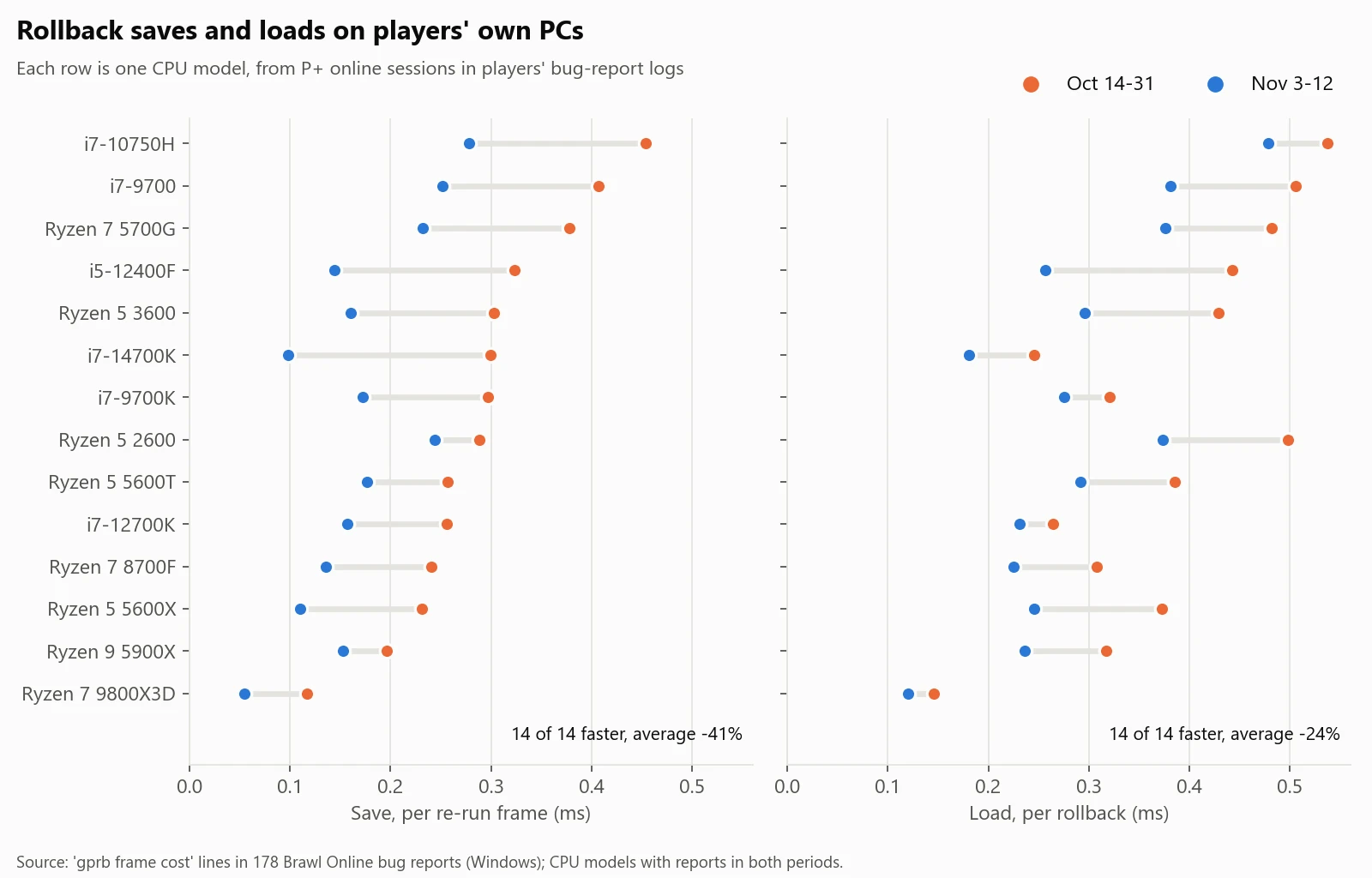
- 22–35% Faster Rollbacks in Project+: When rolling back multiple frames, intermediate re-simulated frames are never shown on your monitor. Skipping non-gameplay impacting rendering during those unseen passes cut the cost of rollbacks by about a third.
- Streamlined Memory Snapshotting: We've been optimizing how the rollback snapshots are captured and stored. With better identification of memory blocks that didn't actually change, better dirty memory flagging inside the JIT, and rolling back more surgical snippets of gameplay memory, or just doing fewer rollbacks when we didn't need to do it, we've managed to make rollback far more computationally efficient. Combined with new optimizations in the Dolphin JIT compiler, rollback re-simulations run smoother than ever.
- Potato Mode for Low-Spec PCs: Playing on an older laptop or integrated graphics? Try enabling Potato Mode which disables character shadows and stage background models, saving up to 12% of CPU time and 27% of GPU time.
Bringing the GameCube & Wii Library Online in "Other Games"
Unlike Project+, the Other Games tab snapshots the entire emulated console so any GameCube or Wii title can be played online. It turns out this is very hard, actually, but our wonderful users have been helping us find every sharp edge along the way! Getting strong compatibility took several whole new architectures:
- Chunked GameCube Audio RAM Snapshots: On the GameCube, the audio processor's 16 MB of Audio RAM is separate hardware state, and copying all 16 MB on every frame caused GameCube fighters like Naruto: Gekitou Ninja Taisen 4 to drop below 60 fps during rollbacks. We built a custom 4 KB chunk-versioned ARAM snapshotter, copying only the tiny audio slices that changed each frame.
- GameCube Hardware Rollback Compatibility: We gated disk-streamed GameCube music so songs never repeat or skip during rollbacks (Super Monkey Ball 2, GNT4), tracked GameCube "fake VMEM" paging so 4-player Super Mario Strikers rooms stay in sync, and mounted synchronized GameCube Slot A memory cards.
- Built-In Gecko & Action Replay Code Manager: Every disk-booted game in Other Games now automatically syncs the host's active codes to everyone in the room.
- Cross-Hardware Determinism: We resolved a slate of deep hardware synchronization puzzles across different CPUs and GPUs, preventing dual-core CPU/GPU thread races that corrupted Mii eyes in Wii Sports and crashed Super Monkey Ball 2. We also now preserve original instructions when Gecko codes self-modify game RAM without cache invalidation, and keep 64-bit clock reads identical across differing JIT block boundaries. Floating-point rounding tie-breakers are fixed on pre-2011 CPUs, so every machine stays locked in sync. You guys have many very diverse computers and your reports have been so helpful in squashing compatibility bugs!
Community Spotlight: Brawl Recompiled Crossplay Experiments
One of the most exciting parts of building an open platform is seeing what passionate developers build around it. Over the past week, kalomaze has been experimenting with wiring up rollback netcode and crossplay between the native Brawl Recompiled (Emissary) and Brawl Online's Dolphin. While this is an independent community effort rather than an official Brawl Online feature right now, early tests have already completed over 1,000 live online frames and nearly 20,000 replay frames between Brawl Recompiled and Dolphin with zero desyncs.
This is a crazy effort that highlights the amazing community we have!
Thank you to the thousands of players who have already made Brawl Online part of their daily routine! Here's to the next 150,000 matches <3